How Tagnet Works
Tagnet is an enterprise RFID inventory and tracking platform. It connects to the RFID readers on your floor, turns the raw tag reads into clean inventory movements, and gives your team live visibility plus automated actions. No one has to scan a clipboard or key in counts. The same platform fits many jobs: work-in-progress tracking in manufacturing, utility pole and transformer tracking across a network, vendor-managed inventory for consumables, and IT and capital asset tracking.
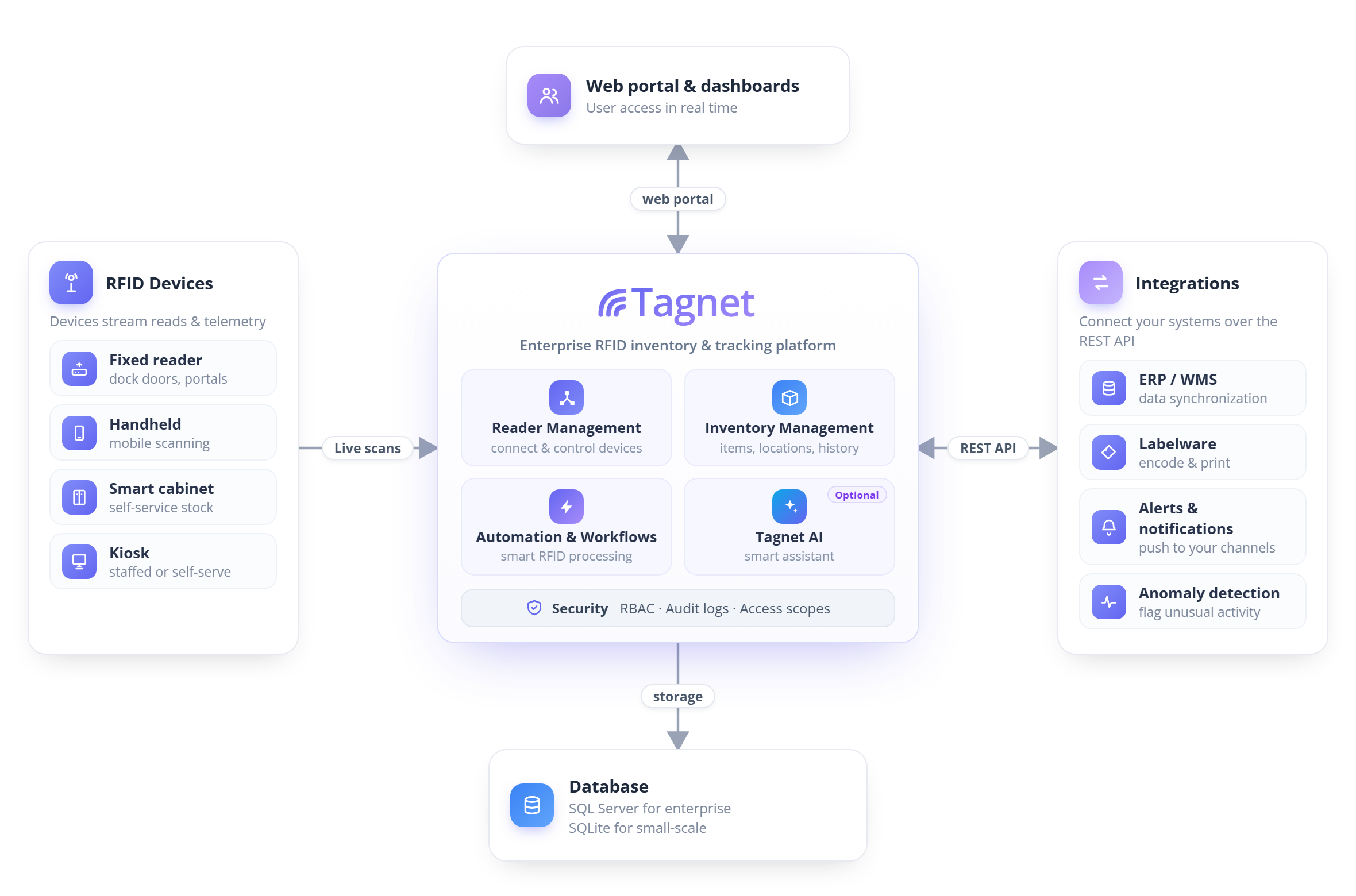
From tag to action
Every time a reader sees a tag, Tagnet turns that read into a trusted inventory action. Here is the journey, from the floor to your team and systems:
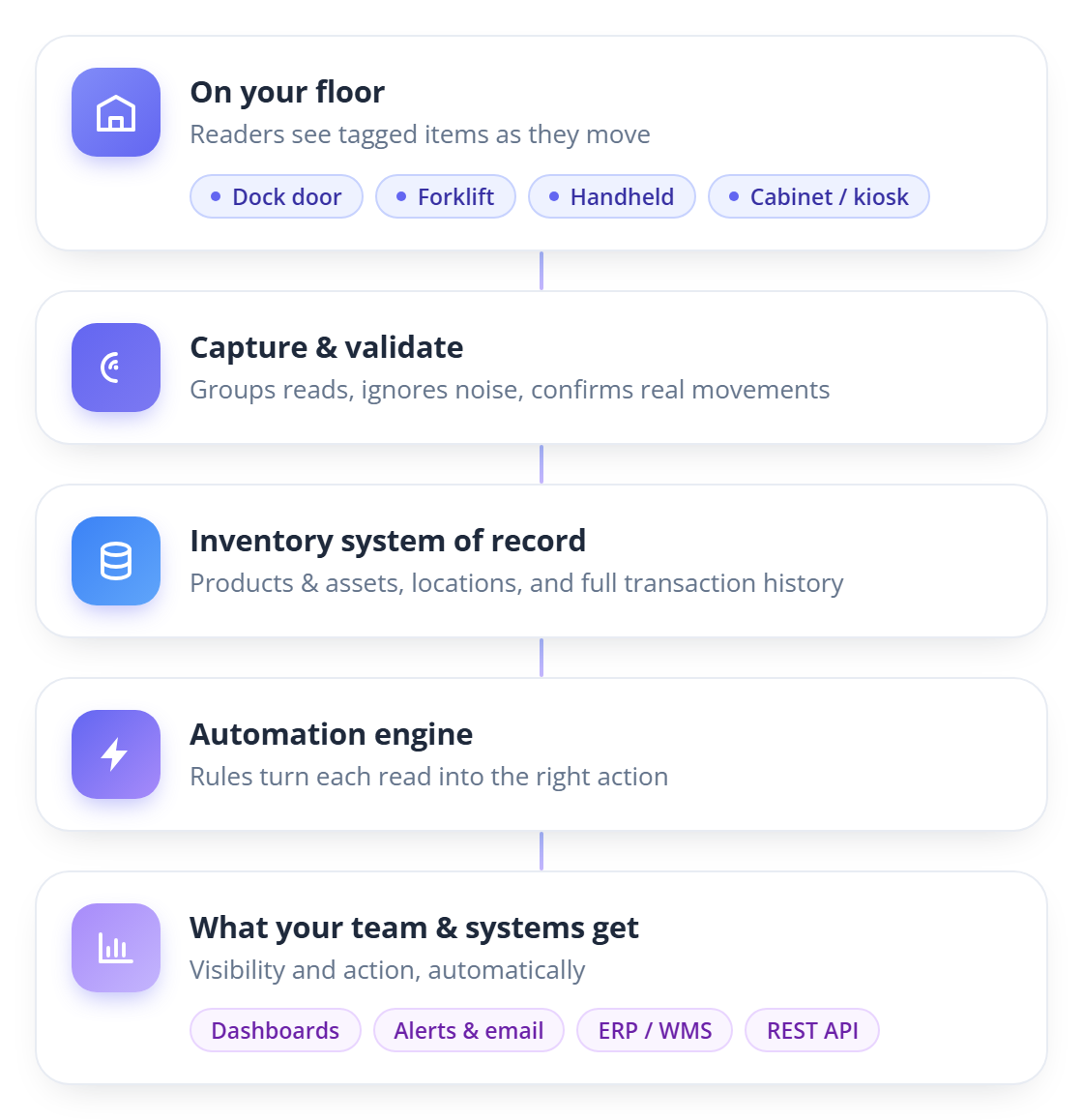
- On your floor: Each item carries an RFID tag. Whatever device is closest reads it: a dock-door reader, a forklift reader, a handheld scanner, or a smart cabinet or kiosk.
- Capture and validate: Tagnet groups the reads, ignores stray background noise, and confirms when something actually moved. This is what separates a real movement from a tag that simply sat within range.
- Inventory system of record: Confirmed movements update a complete model of your inventory: products and assets, where they are, and a full history of every transaction.
- Automation engine: Rules turn those reads into actions automatically.
- What your team and systems get: Live dashboards, in-app alerts, outbound HTTP calls to external systems (ERP, WMS, or any HTTP endpoint), and an open REST API for everything else.
A scenario anyone can follow: A tagged pallet rolls through the receiving dock. The dock-door reader sees it, Tagnet confirms it is a real movement, records the receipt against the right product, moves it into Receiving, sends the supervisor an in-app alert, and posts the update to your ERP via an outbound HTTP call. No one scanned a barcode or typed anything.
Automation that does the work
Most of the day-to-day value comes from the automation engine. Every rule follows the same simple shape, so it is easy to reason about: something happens, Tagnet checks whether it matters, then it acts.
- Trigger: A scan event happens, for example a pallet read at the dock.
- Filter: Tagnet checks whether the event matches the conditions you set, such as a specific reader, item type, or location.
- Act: When it matches, Tagnet runs one or more actions. It can move inventory (receive, put-away, ship), send an in-app alert, or call an external system with a formatted HTTP payload.
Because the rules are configured rather than coded, your team can adjust how Tagnet responds without a software release.
Security and access
Tagnet controls who can see and do what. Role-based access control sets each user's permissions, access scopes segment data by site, department, or business unit, and an audit trail records security-relevant activity for review.
Where Tagnet runs
Tagnet installs on your own Windows Server (Tagnet Enterprise) or runs hosted for you (Tagnet Cloud). Either way, your deployment is a dedicated instance with its own database, so your data is fully isolated.
Next steps
- Ready to set up your server? See the Installation Guide.
- Server running? Setting Up Tagnet lists what an installation needs and why the steps come in the order they do.
- Want to see the whole path once? Your First Tracked Item takes one tag from nothing to an automatic move.
- Planning a real deployment? The Use-Case Playbooks cover manufacturing WIP tracking, IT and capital asset tracking, vendor-managed inventory for consumables, and utility infrastructure.
- Once you are running, the dashboards give you the live view described above. Reader Setup Recipes and device groups tune how reads are captured, workflows decide how Tagnet responds, and read signatures learn what normal reads look like at each read point and show which tags read unusually.